Icon of program: Cover Stream

Cover Stream for Mac

  • Trial version
  • 3
    6
  • 2K
  • V2.6.2
Download for Mac

View an ad to download for free

A Cover Flow for your desktop

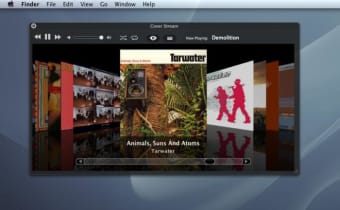
With Cover Stream you can enjoy the beauty of your iTunes' Cover Flow on your Mac's desktop.

Top Recommended Alternative

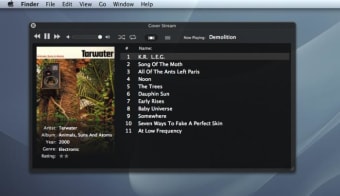
The application takes the feature onto your desktop so you don't even need to have iTunes opened to browse through all your albums. Flip browsing, which lets you turn over an album to view and select a track is something great and that Cover Flow definitely lacks.

Cover Stream also includes playback functions to control your songs and you can use a number of keyboard shortcuts to activate it faster. If you don't necessarily want neither iTunes nor Cover Stream up and cluttering your desktop you can keep them minimized and use the Mini-Flow view, much more discreet yet displaying the album cover and essential information.

On the whole Cover Stream performs well, however it can be known to use up a lot of RAM. We suggest trying not to have it on all the time.

Despite using up a bit or RAM, Cover Stream is a great way of enjoying Cover Flow and playing your iTunes music from your desktop.


  • Pros

    • Nice UI
    • Browse through albums
    • Quick playback functions
  • Cons

    • Can use a lot of RAM
 0/3

App specs

  • Developer

  • License

    Trial version

  • Version

    2.6.2

  • Latest update

  • Platform

    Mac

  • OS

    Mac OS X

  • Language

    English

  • Downloads

    2K

  • Size

    2.47 MB

Program available in other languages


Icon of program: Cover Stream

Cover Stream for Mac

  • Trial version
  • 3
    6
  • 2K
  • V2.6.2
Download for Mac

View an ad to download for free


User reviews about Cover Stream

3

1 reviews

Add review

Main reviews for you

  • Anonymous user

    So far so good, nice and simple to use.. So far so good, nice and simple to use. The only criticism is that the covers seem to take a while to become sharp when they appear. Did have a few freezes, but when I reset the preferences, it seemed to clear them up. Pros: No fuss and ease of use.Clarity. Cons: The only criticism is that the covers seem to take a while to become sharp when they appear.Did have a few freezes, but when I reset the preferences, it seemed to clear them up.

More

You may also like

Explore Apps

Latest articles

Laws concerning the use of this software vary from country to country. We do not encourage or condone the use of this program if it is in violation of these laws.
Softonic

Is Cover Stream safe?

100/100

Score result: Clean

This file passed a comprehensive security scan using VirusTotal technology. It is safe to download.

  • Virus free
  • Spyware free
  • Malware free
  • Verified by Security Partners

    VirusTotal logo

Scan Info

Last scan
Tuesday, April 23, 2024
Scan provider
VirusTotal · Full report

File Integrity

File
CoverStream_2.6.2.zip
SHA256
8ceda4e329bd7ae88296bac27f02468000fd941eb99914702c4bbc6da77edf9e
SHA1
fc83145c0ed9f1502e4964e8fcf56dbe425ac272

Softonic security commitment

Cover Stream has been thoroughly scanned by our advanced security systems and verified by industry-leading partners. This file comes from the official developer and has passed all our security checks, showing no signs of viruses, malware, or spyware. For more information, visit our Security and Trust Center

Signed in to Softonic as